
Coding Tools
Top medical coding automation tools

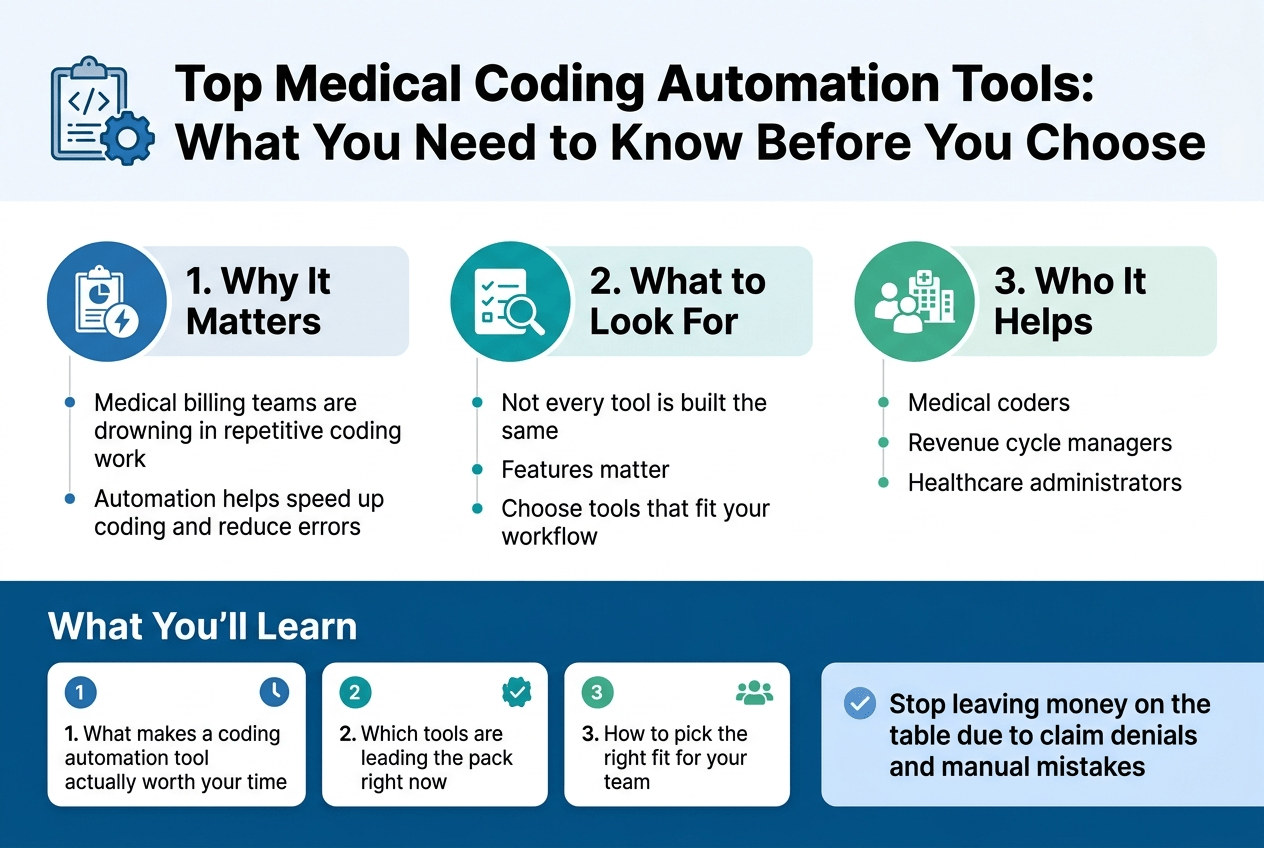
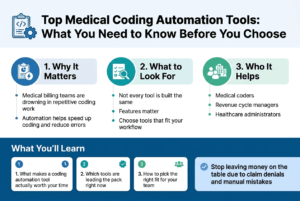
Top Medical Coding Automation Tools:
Discover the top medical coding automation tools that boost accuracy and efficiency. Streamline your coding process…..
Medical billing teams are drowning in repetitive coding work, and that’s exactly why so many healthcare organizations are turning to top medical coding automation tools to speed things up and cut down on errors.
This guide is for medical coders, revenue cycle managers, and healthcare administrators who want to stop leaving money on the table due to claim denials and manual mistakes.
Here’s what we’ll walk through:
- What makes a coding automation tool actually worth your time — not every tool is built the same, and the features you pick matter
- Which tools are leading the pack right now — a straightforward look at the options that are getting real results
- How to pick the right fit for your team — because the best tool for a large hospital system isn’t always the best tool for a small clinic
By the end, you’ll have a clear picture of where to start and what to look for — no guesswork needed.
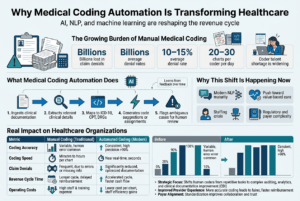
Why Medical Coding Automation Is Transforming Healthcare
The Growing Burden of Manual Medical Coding
Medical coding has always been one of those behind-the-scenes functions that keeps healthcare running — but it has also been one of the most error-prone and time-consuming parts of the entire revenue cycle. A single patient encounter can generate dozens of diagnosis codes, procedure codes, and modifier combinations. Trained coders have to sift through clinical documentation, interpret physician notes (which are often incomplete or inconsistent), and assign the right codes from code sets like ICD-10-CM, CPT, and HCPCS — all while keeping up with annual code updates and payer-specific rules.
The numbers tell a clear story:
- Coding errors account for billions of dollars in claim denials every year across U.S. healthcare systems
- The average denial rate hovers around 10–15% for many hospitals, with a significant chunk tied directly to coding inaccuracies
- Manual coding productivity typically maxes out at 20–30 charts per coder per day, depending on case complexity
- Experienced medical coders are in short supply, and the talent gap is widening as demand grows
These pressures — financial, operational, and staffing-related — are what pushed the healthcare industry to seriously explore automation as a real solution rather than a distant idea.
What Medical Coding Automation Actually Does
Medical coding automation uses a combination of artificial intelligence, natural language processing (NLP), and machine learning to read clinical documentation and suggest or assign the appropriate medical codes — automatically, and at a speed no human coder can match.
At a high level, here’s how it works:
- Ingests clinical documentation — including physician notes, operative reports, discharge summaries, and lab results
- Extracts clinically relevant information — symptoms, diagnoses, procedures, medications, and risk factors
- Maps that information to standardized code sets — ICD-10, CPT, DRGs, and others
- Generates code suggestions or autonomous code assignments — depending on the tool’s confidence level and the organization’s workflow settings
- Flags ambiguous cases for human review — so coders focus their attention where it actually matters
The best systems don’t just automate the easy cases. They learn from feedback over time, improving accuracy as they process more data from your specific patient population and clinical environment.
Why This Shift Is Happening Now
A few things converged to make medical coding automation genuinely viable at scale right now, rather than just a theoretical concept.
The Maturity of NLP Technology
Earlier attempts at coding automation struggled because NLP wasn’t sophisticated enough to handle the messy, unstructured nature of clinical documentation. Physicians don’t write in clean, structured sentences — they abbreviate, they use shorthand, they contradict themselves, and they leave gaps. Modern NLP engines, especially those trained on large clinical datasets, can now parse this kind of text with impressive accuracy.
The Push Toward Value-Based Care
As healthcare moves away from fee-for-service models and toward value-based arrangements, accurate and thorough coding becomes even more critical. Hierarchical Condition Categories (HCCs), risk adjustment scores, and quality metrics all depend on having complete and precise diagnosis coding. Automation helps close documentation gaps that manual coding often misses.
The Staffing Crisis in Coding Departments
Qualified coders are genuinely hard to find and harder to retain. Credentialed professionals like CPC, CCS, and RHIA holders take years to train and are expensive to employ. Many healthcare organizations are dealing with chronic understaffing, high turnover, and backlogs that stretch into weeks. Automation tools directly address throughput problems without requiring headcount increases.
Regulatory and Payer Complexity
The coding landscape gets more complicated every year. New codes are added, payer-specific rules change, and compliance requirements shift. Keeping a human coding team current on all of these changes is an ongoing challenge. Automated tools that are continuously updated to reflect current code sets and payer guidelines take a significant compliance burden off the table.
The Real Impact on Healthcare Organizations
Organizations that have adopted top medical coding automation tools are seeing measurable results across several dimensions:
| Metric | Before Automation | After Automation |
|---|---|---|
| Coder productivity | 20–30 charts/day | 50–100+ charts/day |
| First-pass claim acceptance rate | 85–88% | 92–96% |
| Average coding turnaround time | 3–5 days | Same day or next day |
| Denial rate (coding-related) | 10–15% | 4–7% |
| Coder time on complex cases | ~40% | ~70%+ |
Beyond the numbers, there’s a qualitative shift happening inside coding departments. When automation handles the straightforward, high-volume cases, experienced coders can redirect their expertise toward complex encounters — the ones that genuinely need clinical judgment, query management, and nuanced interpretation. That’s a better use of skilled labor, and it tends to improve job satisfaction as well.
Healthcare organizations are also finding that automation creates a cleaner audit trail. Every code suggestion is documented with supporting evidence pulled from the clinical note, making compliance reviews and payer audits much easier to navigate.
Autonomous Coding vs. Computer-Assisted Coding
It’s worth drawing a clear line between two types of tools that often get lumped together:
Computer-Assisted Coding (CAC):
- Suggests codes to a human coder for review and approval
- The coder makes the final call on every code assignment
- Speeds up the process but still requires significant human involvement
- Better suited for complex cases or organizations new to automation
Autonomous Coding:
- Assigns codes without human review for cases that meet a confidence threshold
- Human coders only review flagged or low-confidence cases
- Dramatically higher throughput
- Requires a higher degree of trust in the system and strong validation protocols
Many of the top medical coding automation tools on the market today offer a hybrid approach — autonomous coding for simpler, high-volume encounter types (like evaluation and management visits or routine outpatient encounters) while routing complex or ambiguous cases to human coders. This blended model tends to be the sweet spot for most healthcare organizations.
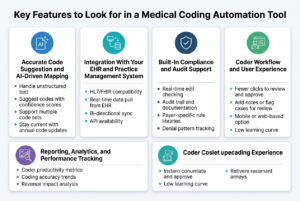
Key Features to Look for in a Medical Coding Automation Tool
Accurate Code Suggestion and AI-Driven Mapping
The core job of any coding automation tool is to take clinical documentation and map it to the right codes — whether that’s ICD-10, CPT, HCPCS, or others. The best tools don’t just guess; they use natural language processing (NLP) and machine learning models trained on millions of real-world claims to understand clinical context.
Look for tools that can:
- Handle unstructured text — Most clinical notes aren’t neatly formatted. A strong tool reads free-text physician notes, discharge summaries, and op reports, not just structured fields.
- Suggest codes with confidence scores — Good tools tell you how confident they are in each suggestion, so coders know where to focus their attention.
- Support multiple code sets — You need a tool that works across ICD-10-CM, ICD-10-PCS, CPT, and E/M coding without switching platforms.
- Stay current with annual code updates — Code sets change every year. Your tool should update automatically without requiring manual patches or downtime.
Integration With Your EHR and Practice Management System
A coding tool that sits outside your existing workflow creates more problems than it solves. The top medical coding automation tools are built to plug directly into your EHR, whether that’s Epic, Cerner, athenahealth, eClinicalWorks, or others.
Key integration capabilities to check for:
| Feature | Why It Matters |
|---|---|
| HL7/FHIR compatibility | Ensures smooth data exchange between systems |
| Real-time data pull from EHR | Coders work with live documentation, not exports |
| Bi-directional sync | Approved codes flow back into billing without manual re-entry |
| API availability | Lets your IT team build custom connections if needed |
If a vendor can’t show you a live integration demo with your specific EHR, that’s a red flag worth taking seriously.
Built-In Compliance and Audit Support
Coding errors aren’t just a billing problem — they create compliance exposure. A strong automation tool should actively help you stay on the right side of payer rules and regulatory requirements.
Watch for these compliance-focused features:
- Real-time edit checking — The tool flags coding errors, unbundling issues, and NCCI edits before a claim goes out the door.
- Audit trail and documentation — Every code change, suggestion, and override should be logged with timestamps and user info for internal audits.
- Payer-specific rule libraries — Medicare, Medicaid, and commercial payers all have different rules. The tool should know the difference.
- Denial pattern tracking — Some tools analyze your denial history and flag documentation patterns that keep triggering rejections.
Coder Workflow and User Experience
Even the smartest AI won’t help much if coders hate using it. Workflow design matters more than most people give it credit for. A clunky interface slows people down and leads to workarounds that defeat the whole purpose of automation.
Things to evaluate:
- How many clicks does it take to review and approve a suggested code? Fewer is better.
- Can coders add notes or flag cases for review? Collaborative features reduce bottlenecks.
- Is there a mobile or web-based option? Remote coders need flexibility.
- How steep is the learning curve? Ask for data on average onboarding time for new users.
Reporting, Analytics, and Performance Tracking
You can’t improve what you can’t measure. Solid reporting tools give coding managers and revenue cycle leaders a clear picture of what’s working and what’s not.
Look for dashboards that show:
- Coder productivity metrics — Charts coded per hour, acceptance rates on AI suggestions, override rates
- Coding accuracy trends — Track error rates over time and by specialty or provider
- Revenue impact analysis — See how coding changes affect reimbursement levels
- Denial and rejection rates — Broken down by payer, code type, or department
The best tools let you build custom reports, not just rely on pre-built templates that may not match your organization’s priorities.
Specialty-Specific Coding Support
General coding logic doesn’t always hold up in specialized environments. A cardiology practice codes very differently than a behavioral health clinic or an orthopedic surgery center. If your organization operates across multiple specialties, or runs a particularly complex service line, your tool needs to reflect that.
Ask vendors specifically about:
- Which specialties their AI models have been trained on
- Whether they offer specialty-specific modules (e.g., radiology coding, E/M complexity scoring, risk adjustment for HCC coding)
- How they handle surgical coding from operative reports
- Whether their tool supports facility coding, professional fee coding, or both
Scalability and Cloud Infrastructure
Your coding volume today won’t look the same in three years. Whether you’re growing through acquisitions, expanding service lines, or simply increasing patient volume, your automation tool needs to grow with you.
Scalability questions worth asking:
- Is the platform cloud-based? Cloud infrastructure scales far more easily than on-premise deployments.
- How does pricing change as volume grows? Some vendors charge per claim, others per user — understand the math at higher volumes.
- Can the tool handle multi-site or multi-entity organizations? Enterprise-level features matter if you manage coding across multiple facilities or physician groups.
- What’s the uptime guarantee? Downtime during high-volume coding periods is expensive. Look for SLAs that promise 99.9% uptime or better.
Top Medical Coding Automation Tools Worth Considering
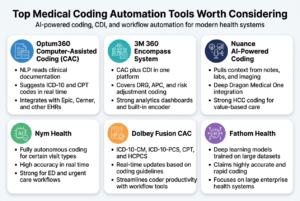
Optum360 Computer-Assisted Coding (CAC)
Optum360 is one of the most widely recognized names when it comes to medical coding automation, and for good reason. Their CAC platform uses natural language processing (NLP) to read clinical documentation and suggest ICD-10 and CPT codes in real time. It works alongside your existing EHR system rather than replacing it, which makes adoption a lot smoother for most organizations.
Key highlights:
- Integrates with major EHR platforms including Epic and Cerner
- Supports both inpatient and outpatient coding workflows
- Provides a confidence score for each suggested code so coders can prioritize their review
- Offers detailed audit trails for compliance purposes
Hospitals that have rolled out Optum360 CAC typically report faster coding turnaround times and a measurable drop in denial rates. It’s a strong fit for mid-to-large health systems that process high volumes of charts daily.
3M 360 Encompass System
3M has been in the health information management space for decades, and their 360 Encompass system reflects that depth of experience. The platform combines computer-assisted coding with clinical documentation improvement (CDI) tools, so your coding team and CDI specialists can work in the same environment without constantly switching between systems.
What makes it stand out:
- Covers DRG grouping, APC assignment, and risk adjustment coding
- Includes built-in encoder functionality, reducing the need for third-party tools
- Uses machine learning models trained on massive datasets of real clinical records
- Offers strong analytics dashboards that help leadership spot coding trends and revenue cycle gaps
This tool works especially well for academic medical centers and large hospital networks where complexity and volume are both high.
Nuance AI-Powered Coding
Nuance, now part of Microsoft, brings serious AI muscle to the coding automation space. Their platform goes beyond code suggestions by pulling context from the full patient record, including physician notes, lab results, and imaging reports. This fuller picture leads to more accurate code assignments and fewer missed diagnoses.
Standout features:
- Deep integration with Dragon Medical One for voice-to-text documentation
- Predictive coding that learns from coder behavior over time
- Supports specialty-specific coding across cardiology, oncology, orthopedics, and more
- Strong focus on HCC (Hierarchical Condition Category) coding for risk adjustment in value-based care contracts
Organizations moving into value-based care arrangements tend to find Nuance particularly valuable because of its HCC focus and its ability to flag documentation gaps before they become revenue problems.
Nym Health
Nym Health is one of the newer players gaining serious traction in the top medical coding automation tools conversation. Unlike legacy systems that rely heavily on rules-based logic, Nym built its platform from the ground up using clinical AI and deep language models. The system reads clinical notes the way a human coder would, understanding context and clinical meaning rather than just pattern-matching keywords.
Why coders and administrators love it:
- Fully autonomous coding for certain visit types, not just suggestions
- High accuracy rates with real-time processing
- Works well for high-volume specialties like emergency medicine and urgent care
- Transparent reasoning that shows exactly why a code was selected
Nym is a particularly exciting option for organizations looking to reduce their reliance on manual coding for routine encounters while freeing up experienced coders to handle more complex cases.
Dolbey Fusion CAC
Dolbey’s Fusion CAC platform is a solid option for organizations that want robust computer-assisted coding without the enterprise-level price tag that some of the bigger names carry. It uses NLP to analyze clinical documents and generate code suggestions, with a user interface that most coders find clean and easy to navigate.
Key features:
- Supports ICD-10-CM, ICD-10-PCS, CPT, and HCPCS coding
- Offers both inpatient and outpatient modules
- Customizable workflows that match how your team already operates
- Strong customer support reputation, which matters a lot during implementation
Dolbey tends to be a popular choice among community hospitals and specialty practices that need a capable, reliable tool without unnecessary complexity.
Artifacts Health
Artifacts Health takes a targeted approach by focusing specifically on physician query and CDI automation. Rather than replacing the coder, it helps surface documentation issues before coding even begins. The platform uses AI to scan records and automatically generate compliant physician queries when clinical documentation is incomplete or ambiguous.
What sets it apart:
- Reduces query response time dramatically
- Improves case mix index by ensuring conditions are properly documented and coded
- Works directly inside the EHR without requiring physicians to log into a separate system
- Built specifically for CDI teams working in inpatient environments
For organizations where CDI and coding are tightly linked, adding Artifacts Health alongside a CAC tool creates a powerful end-to-end solution.
Quick Comparison at a Glance
| Tool | Best For | Coding Type | AI/NLP Strength | EHR Integration |
|---|---|---|---|---|
| Optum360 CAC | Mid-to-large health systems | Inpatient & Outpatient | Strong | Epic, Cerner, others |
| 3M 360 Encompass | Academic & large networks | Inpatient, DRG, APC | Very Strong | Broad |
| Nuance AI Coding | Value-based care orgs | Multi-specialty, HCC | Very Strong | Deep Microsoft/Epic ties |
| Nym Health | High-volume specialties | ED, Urgent Care | Cutting-edge | Growing |
| Dolbey Fusion CAC | Community hospitals | Inpatient & Outpatient | Moderate-Strong | Flexible |
| Artifacts Health | CDI-focused teams | Inpatient CDI/Queries | Strong | EHR-native |
Each of these tools solves a real problem in the coding workflow, but they approach it from slightly different angles. The right fit depends on your patient population, coding volume, specialty mix, and how deeply you want AI involved in the process.
How to Evaluate Which Tool Best Fits Your Organization
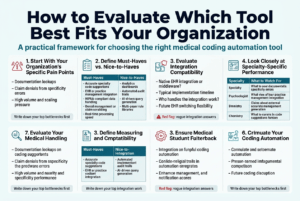
Start With Your Organization’s Specific Pain Points
Before you even open a demo link or talk to a sales rep, get clear on what’s actually breaking down in your current coding workflow. Are your coders spending too much time on documentation lookups? Are claim denials piling up because of specificity errors? Is your team drowning in volume with no room to scale?
Write down your top three or four bottlenecks. Every tool in the market will promise to solve everything, but the ones that actually address your specific problems are the ones worth spending time on. This clarity will also make vendor conversations far more productive.
Define Your Must-Have Features vs. Nice-to-Haves
Not every feature in a top medical coding automation tool will matter to your organization. Build a two-column list before you start evaluating:
Must-Haves (non-negotiable):
- Accurate code suggestions for your specialty (e.g., orthopedics, behavioral health, primary care)
- Integration with your existing EHR or practice management system
- HIPAA-compliant data handling
- Denial management or claim scrubbing capabilities
- Real-time or near-real-time processing speed
Nice-to-Haves (great if included, not a dealbreaker):
- Built-in analytics dashboards
- Automated audit trails
- AI-driven query generation
- Multi-payer rule libraries
Keeping this list visible during demos stops you from getting distracted by flashy features that look impressive but won’t move the needle for your team.
Evaluate Integration Compatibility Carefully
One of the most overlooked steps when choosing among the top medical coding automation tools is checking how well a platform actually plugs into your existing tech stack. A tool that requires a full system overhaul to implement is going to cost you far more in time, money, and disruption than the sticker price suggests.
Ask vendors these specific questions:
- Does your tool integrate natively with [your EHR name], or does it require a third-party middleware?
- What does the typical implementation timeline look like?
- Who handles the integration work — your team or theirs?
- What happens if we switch EHR systems in two years?
If a vendor can’t give you a straight answer on integration, that’s a red flag worth paying attention to.
Look Closely at Specialty-Specific Performance
A general-purpose automation tool might perform beautifully on straightforward E&M codes but struggle badly with complex surgical procedures, behavioral health documentation, or rare diagnosis codes. Specialty fit matters enormously.
| Specialty | What to Watch For |
|---|---|
| Orthopedics | Accuracy with procedure-heavy ICD-10 and CPT codes |
| Behavioral Health | Support for time-based billing and mental health-specific modifiers |
| Oncology | Handling of complex multi-code encounters and chemotherapy regimens |
| Primary Care | Speed and accuracy on high-volume, straightforward encounters |
| Emergency Medicine | Real-time coding capability and fast turnaround |
Ask vendors for accuracy benchmarks broken down by specialty. If they only share overall accuracy rates without specialty-level data, push harder or treat that number with skepticism.
Request a Real-World Pilot, Not Just a Demo
Demos are always going to show a tool at its best. What you really need is a controlled pilot using your own data, your own documentation, and your actual patient population. Even a two-to-four week pilot on a limited set of records can reveal things no demo ever will:
- How accurate is the coding on your specific case mix?
- How steep is the learning curve for your coders?
- Where does the tool underperform or flag uncertainty?
- How responsive is the support team when issues come up?
Document everything during the pilot. Track accuracy rates, time spent correcting suggestions, and coder feedback. That data becomes your evaluation scorecard.
Factor In Total Cost of Ownership
The subscription price is just the beginning. When comparing top medical coding automation tools, calculate the full cost picture:
- Implementation costs — setup fees, data migration, custom configuration
- Training costs — time your staff will spend getting up to speed
- Integration costs — any middleware or IT work required
- Ongoing support costs — what’s included in the base contract vs. what’s extra
- Downtime risk — what does a system outage cost your organization per day?
Build a 12-month and 36-month total cost model for each vendor you’re seriously considering. The cheapest tool upfront is rarely the cheapest tool over time.
Check the Vendor’s Track Record and Stability
A vendor that goes out of business or gets acquired in year two leaves your operation scrambling. Do some homework:
- How long has the company been operating?
- Who are their current clients, and can you speak to references in your specialty?
- Have they had major data breaches or compliance violations?
- Are they actively investing in R&D, or does the product feel stagnant?
- What does their customer retention rate look like?
A vendor confident in their product will welcome these questions. One that gets evasive or redirects to marketing materials probably has something to hide.
Involve Your Coders in the Decision
Your coding staff will be using this tool every single day. If they find it clunky, confusing, or counterproductive, adoption rates will tank no matter how impressive the technology looks on paper.
Bring at least two or three of your experienced coders into the pilot evaluation. Have them score the tool on:
- Ease of use and workflow fit
- Quality of code suggestions
- Speed of the interface
- How well it handles edge cases and uncommon diagnoses
Their on-the-ground feedback is worth more than any analyst report.
Proven Tips for Successfully Implementing a Coding Automation Tool
Proven Tips for Successfully Implementing a Coding Automation Tool
Getting a coding automation tool up and running is one thing. Getting your team to actually trust it, use it correctly, and see results from it — that’s the real challenge. Here’s what actually works when rolling out one of the top medical coding automation tools in a real clinical environment.
Start With a Pilot, Not a Full Rollout
Pick one department or one payer type and test the tool there first. This lets you catch configuration issues, workflow gaps, and staff concerns before they ripple across your entire organization. Emergency medicine and outpatient visits are usually great starting points because the coding volume is high and patterns are more predictable.
Clean Your Data Before You Go Live
Automation tools learn from your existing records. If your historical data is full of errors, outdated codes, or inconsistent documentation habits, the tool will replicate those problems at scale. Do a data audit before implementation, not after.
Get Physicians Involved Early
Coders don’t work in a vacuum. If physicians are used to writing vague, shorthand notes, even the best AI engine will struggle to find the right codes. Hold short training sessions with clinical staff to explain what good documentation looks like for automation purposes. Keep it practical — show them real examples where better notes led to cleaner, faster coding.
Set Clear Benchmarks From Day One
Know what you’re measuring before you flip the switch:
- Coding accuracy rate (target 95% or higher)
- Claim denial rate (track week over week)
- Time to code per chart (should drop within 30–60 days)
- Coder review time (hours spent reviewing AI suggestions)
Without these baselines, you won’t be able to tell if the tool is actually helping.
Train for the Human-in-the-Loop Model
Most top medical coding automation tools are designed to assist coders, not replace them. Your team needs to understand how to review flagged codes, override suggestions when necessary, and report errors back into the system. This feedback loop is how the model improves over time. Skipping this training is one of the most common and costly mistakes organizations make.
Build a Go-Live Support Plan
The first two weeks after launch are critical. Have your vendor’s support team on speed dial, designate an internal “super user” who knows the tool inside out, and create a simple escalation path for issues. Don’t assume the rollout is over once the tool goes live.
Watch Out for Workflow Bottlenecks
Sometimes automation speeds up one part of the process and accidentally creates a traffic jam somewhere else. For example, if the tool codes charts faster than your quality team can review them, you’ll build up a backlog. Map the entire workflow — from patient encounter to claim submission — and identify where the new speed might cause friction.
FAQS
What is medical coding automation?
Medical coding automation uses artificial intelligence and natural language processing to read clinical documentation and assign the correct ICD-10, CPT, and HCPCS codes automatically — or at least suggest them for a coder to review. It cuts down manual work, speeds up billing cycles, and reduces human error.
Are automated coding tools accurate enough to use without human review?
Not yet — at least not across the board. Most tools hit accuracy rates between 85–95% depending on the specialty and complexity of the case. That’s strong, but it means a human coder still needs to review and approve suggestions, especially for complex encounters, high-risk payers, or cases involving multiple comorbidities.
How long does implementation typically take?
It depends on the size of your organization and how complex your workflows are, but most implementations run between 6 to 16 weeks. Smaller practices can sometimes go live faster, while large health systems with multiple EHR integrations may take longer.
Will coding automation work with my current EHR?
Most of the leading tools are built to integrate with major EHR platforms like Epic, Cerner, and Meditech. That said, always verify API compatibility and ask vendors for a list of certified integrations before signing anything.
Does coding automation reduce coding staff?
It typically reduces the volume of manual work per coder rather than eliminating positions entirely. Many organizations redeploy coders into quality review, auditing, and denial management roles — areas where their expertise adds even more value when the routine work is handled by the tool.
What types of medical coding are best suited for automation?
High-volume, lower-complexity encounters tend to automate best:
| Encounter Type | Automation Suitability |
|---|---|
| Outpatient E&M visits | High |
| Emergency department visits | High |
| Radiology and lab reports | Very High |
| Surgical procedures | Moderate |
| Complex inpatient stays | Lower |
How do I justify the ROI to hospital leadership?
Focus on three numbers: reduction in claim denials, decrease in days in AR (accounts receivable), and coder productivity gains. Pull your current baseline for each metric, then ask vendors for case studies from similar organizations. Most of the top medical coding automation tools can show measurable ROI within the first 6–12 months.
Is patient data safe with these tools?
Reputable vendors are HIPAA-compliant and use encryption, role-based access controls, and regular security audits. Always ask for a Business Associate Agreement (BAA) before sharing any patient data and have your compliance team review the vendor’s security documentation.
To Read more Aritcles this type Click Here
Final Thoughts on Making Automation Work for Your Team
The difference between a coding automation rollout that transforms your revenue cycle and one that ends up shelved after three months usually comes down to preparation, people, and patience. The technology itself is solid — especially when you’re working with one of the top medical coding automation tools available today.
What trips organizations up isn’t the software. It’s skipping the data cleanup, underestimating how much change management is involved, or expecting the tool to run on autopilot from day one.
Go in with realistic expectations, keep your coders in the loop as partners rather than treating them like they’re being replaced, and measure everything. When you do that, automation stops being a disruption and starts being the competitive edge your organization actually needs.
Conclusion
Medical coding automation is no longer just a nice-to-have — it’s quickly becoming a must for healthcare organizations that want to stay efficient, reduce errors, and keep revenue cycles running smoothly. From understanding what features actually matter to comparing the top tools on the market, the goal is always the same: finding the right fit for your team and making the transition as smooth as possible.
If you’re ready to take the next step, start small. Pick one or two tools from this list, run a trial, and see how they perform with your real workflows. Talk to your coding staff, get their feedback, and make the decision together. The best tool isn’t always the flashiest one — it’s the one your team will actually use and trust every day.
To Read more Aritcles this type Click Here

-

 Solar Gadgets2 months ago
Crucial Fronus PV5200 Program Settings Explained
-

 Coding Tools2 months ago
Common Errors: “Out of Memory” fix
-

 Coding Tools2 months ago
How to Set Up Continue AI Offline?
-

 Solar Inverter2 months ago
How to Configure Your Solar Inverter Manual
-
 Solar Inverter2 months ago
How to set inverter for 24 hour backup
-

 Solar Gadgets2 months ago
7 Best Solar Powered Camping Gear 2026
Pingback: what are the best ai search monitoring tools? - Techmatrixs